%20--%3e%3csvg%20width='63.297821mm'%20height='39.29665mm'%20viewBox='0%200%2063.297821%2039.29665'%20version='1.1'%20id='svg8765'%20inkscape:version='1.1%20(c4e8f9ed74,%202021-05-24)'%20sodipodi:docname='OBALogoSingle2.svg'%20xmlns:inkscape='http://www.inkscape.org/namespaces/inkscape'%20xmlns:sodipodi='http://sodipodi.sourceforge.net/DTD/sodipodi-0.dtd'%20xmlns='http://www.w3.org/2000/svg'%20xmlns:svg='http://www.w3.org/2000/svg'%3e%3csodipodi:namedview%20id='namedview8767'%20pagecolor='%23ffffff'%20bordercolor='%23666666'%20borderopacity='1.0'%20inkscape:pageshadow='2'%20inkscape:pageopacity='0.0'%20inkscape:pagecheckerboard='0'%20inkscape:document-units='mm'%20showgrid='false'%20fit-margin-top='0'%20fit-margin-left='0'%20fit-margin-right='0'%20fit-margin-bottom='0'%20inkscape:zoom='1.1759259'%20inkscape:cx='179.85827'%20inkscape:cy='102.04724'%20inkscape:window-width='1920'%20inkscape:window-height='972'%20inkscape:window-x='0'%20inkscape:window-y='27'%20inkscape:window-maximized='1'%20inkscape:current-layer='layer1'%20/%3e%3cdefs%20id='defs8762'%20/%3e%3cg%20inkscape:label='Layer%201'%20inkscape:groupmode='layer'%20id='layer1'%20transform='translate(-31.351095,-50.101677)'%3e%3cpath%20style='fill:none;stroke:%233584e4;stroke-width:3.965;stroke-linecap:square;stroke-linejoin:round;stroke-miterlimit:4;stroke-dasharray:none;stroke-opacity:1'%20d='m%2077.07508,77.78787%2014.84134,8.87817%20V%2052.83397%20L%2034.08359,86.5521%20V%2053.69366%20l%2015.27351,9.31107'%20id='path8388'%20sodipodi:nodetypes='cccccc'%20/%3e%3c/g%3e%3c/svg%3e)
There are more than 1,500 companies listed in London alone, and several thousand more across the US markets. Nobody can read that many annual reports. Learning how to screen stocks is how you turn that impossible pile into a short, sensible list you can actually work through. A screener does the filtering in seconds. Your job is to tell it what to look for, then read the results with a clear head.
This guide walks through how to screen stocks the way a careful investor does it: start with a question, set a few sharp criteria, then treat the output as the beginning of your research rather than the end.
How to screen stocks in 5 steps
To screen stocks, choose a market, define the type of company you want, apply two or three filters such as valuation, market cap and risk, sort the results, then research the shortlist. A stock screener creates candidates to investigate, not automatic buy ideas.
- Start with a research question.
- Choose the market you want to search.
- Set two or three filters that match the question.
- Sort the results and remove weak candidates.
- Compare the shortlist before opening full research pages.
| Goal | Useful filters | What to check next |
|---|---|---|
| Find cheaper shares | P/E, P/B, valuation score | Why the market is pricing them cheaply |
| Find growth shares | Revenue growth, earnings growth, Reward score | Whether growth is profitable and repeatable |
| Find dividend shares | Dividend yield, payout cover, Risk score | Whether the dividend is sustainable |
| Find lower-risk shares | Risk score, debt, volatility, market cap | Whether lower risk also means lower upside |
| Find quality shares | Profitability, margins, ROE | Whether the valuation already reflects the quality |
| Compare shortlisted stocks | Side-by-side scores, P/E, yield and performance | Which trade-off deserves deeper research |
If you already know the kind of stock you want, use the screen as a starting point and then read deeper. Our UK growth stocks, FTSE 100 dividend yield, UK value stocks and UK dividend stocks pages show how different filters lead to different kinds of shortlist. Once you have a few candidates, use a stock comparison tool to read the trade-offs side by side. For the underlying measures, see the guides to P/E ratio, dividend yield and stock analysis tools.
What a stock screener actually does
A stock screener is a filtering tool. It searches a database of listed companies and returns only the ones that meet the rules you set. Instead of scrolling through tickers, you tell it the kind of company you want, things like a low valuation, a high quality score, a decent dividend, or a particular sector, and it hands back a shortlist.
The point is not the list itself. The point is what you do with it. Every company that passes your screen is a candidate to research, nothing more.
Step 1: Start with a question, not a filter
This is the step most people skip, and it is the one that matters most. Before you touch a single slider, decide what you are actually looking for. A screen with no question behind it produces a random list.
Good screening questions are plain. Which UK industrials combine strong growth with low risk? Which US stocks look cheap on earnings but still score well for quality? Which dividend payers yield more than the market without carrying heavy debt? Each of those translates cleanly into filters. "Show me good stocks" does not.
Write the question down first. The filters follow from it.
Step 2: Choose your market
Decide where you are investing before you screen. Openbook lets you switch between UK and US listings with a single toggle, and between individual stocks and ETFs, so you keep one market in view at a time or compare across both.
This matters more than it sounds. Most screeners cover one market only. Being able to ask the same question of London and New York, scored on the same framework, means a Reward score of 70 carries the same meaning on both sides of the Atlantic. If you are weighing a UK name against a US peer, that consistency saves you from comparing two different yardsticks.
Step 3: Set your criteria
Now translate your question into filters. The screener groups them so you are not hunting through a wall of options. On the free Basic plan you can currently filter by Reward score, Risk score, P/E, market cap and sector, which is enough to build a genuinely useful screen.
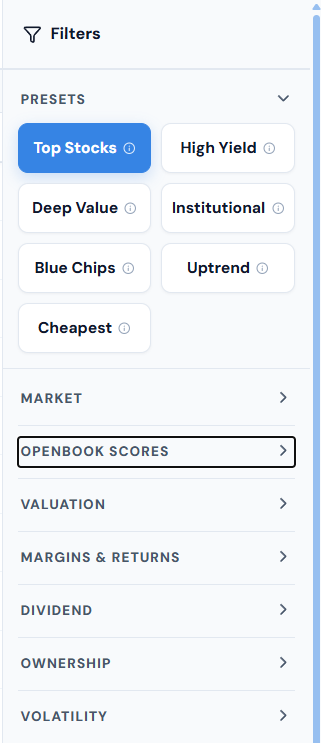
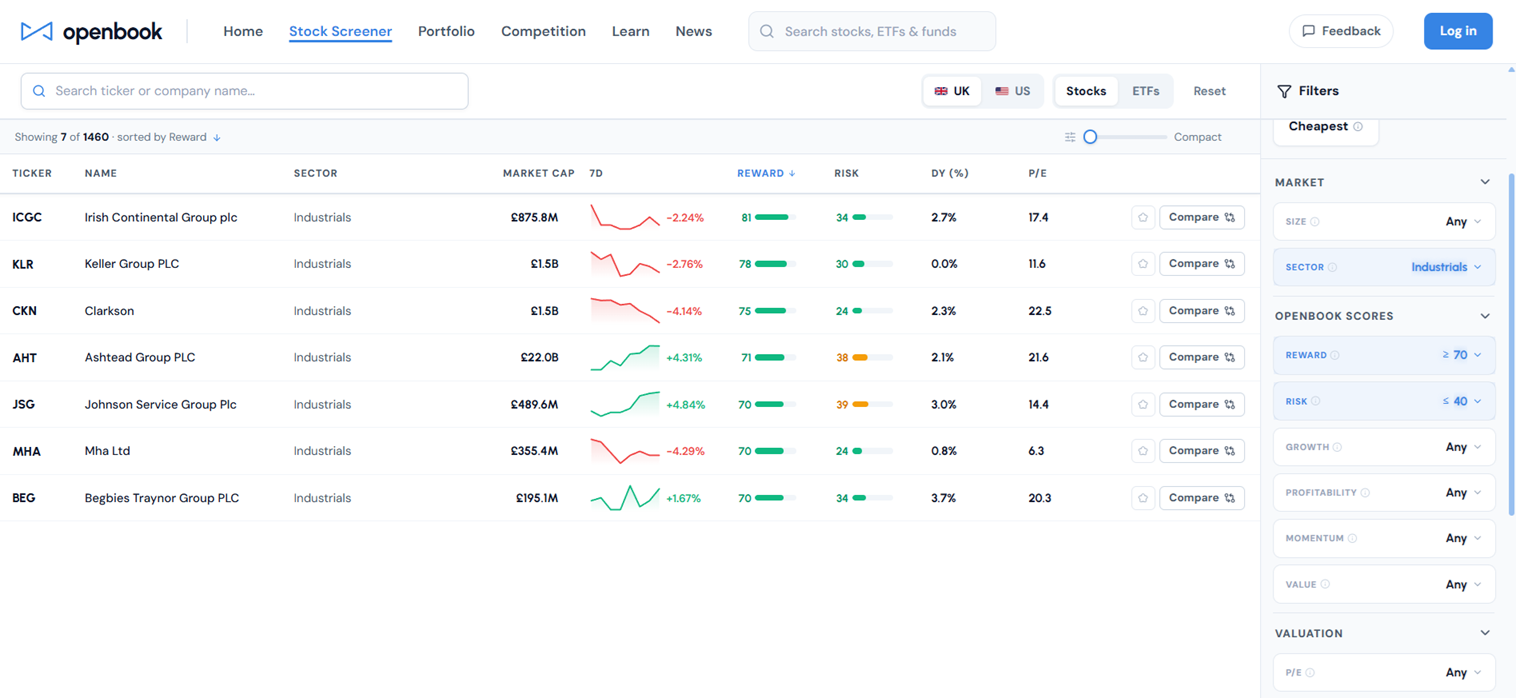
Say your question is "which lower-risk UK industrials still score well for reward." You set the market to UK, choose the Industrials sector, pull the Reward score up to 70 and above, and keep Risk below 40. That alone narrows the whole UK market down to a handful of names.
If you want a faster start, the Presets do the work for you. Top Stocks, High Yield, Deep Value, Blue Chips and the rest each load a sensible set of filters in one click, which you can then adjust. For more granular work, the individual factor filters (Growth, Profitability, Momentum and Value) and the advanced valuation and margin filters let you tighten the screen further.
One rule holds throughout: use as few filters as you can. Each extra criterion removes companies, and some of those will be good ones you have just hidden from yourself.
Step 4: Read the results properly
A screen returns a table, not an answer. In Openbook each row shows the company, its sector, market cap, Reward and Risk scores, dividend yield and P/E, and you can sort by any column by clicking its header. Sorting your shortlist by Reward, or by Risk, often tells you more than the filters did.
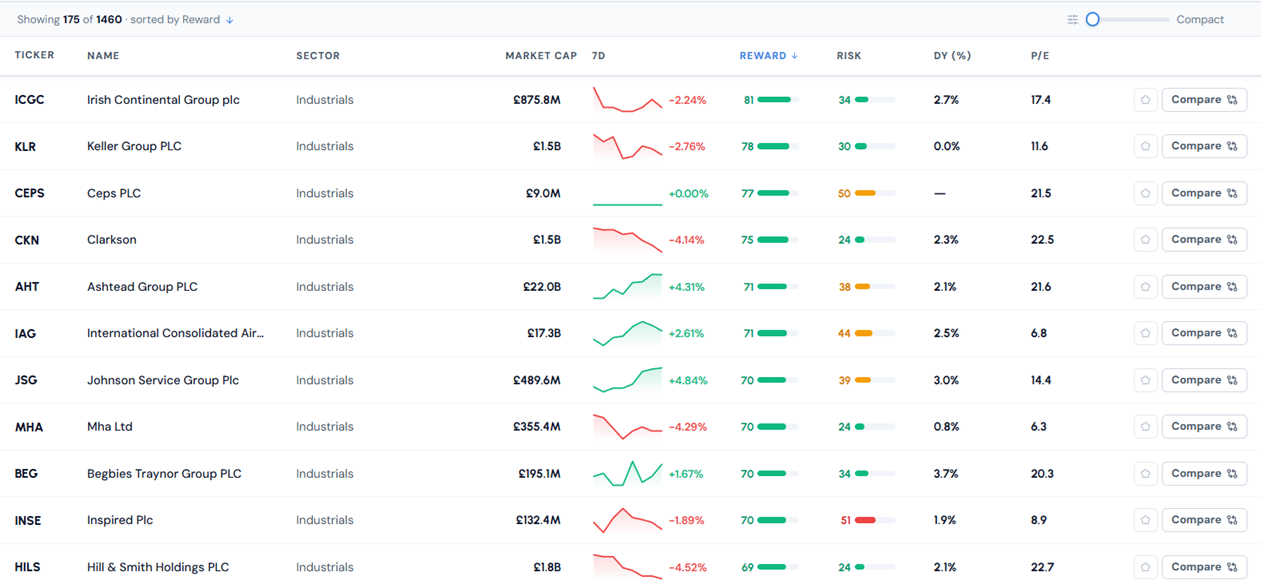
Read the list as a set of questions, not conclusions. Why does this company score so highly for reward? Why is that one's risk score elevated when the rest of the sector sits low? The Compare button lets you put two or three side by side before you commit time to any of them. The aim of this step is simple: turn a list of fifteen tickers into a list of three you genuinely want to understand.
Step 5: From shortlist to decision
Screening narrows the field. Research wins the game. For each name that survives, open its full page and read why it scores the way it does. A high Reward score driven by growth tells a different story from one driven by a cheap valuation, and the factor drivers spell that out.
Look at the risks with the same care you gave the rewards. Check the dividend is covered if income is the point. Read the recent results. Form your own view. Openbook is an educational tool, not an advice service, so a strong score is information, not instruction. The decision stays with you, and the screen has done its job if it pointed you at the right companies to ask about.
Common screening mistakes to avoid
A few habits quietly ruin otherwise good screens:
- Over-filtering. Stacking ten criteria until two stocks remain feels rigorous but usually just hides good companies. Start loose, tighten slowly.
- Chasing a single metric. A low P/E on its own finds cheap stocks and value traps in equal measure. Pair valuation with a quality or risk filter.
- Ignoring risk. A list ranked only on reward will surface some fragile businesses. Always keep one eye on the risk score.
- Treating the output as a buy list. This is the big one. Passing a screen means a company matched your rules, nothing more.
Screen smarter, not harder
Learning how to screen stocks well is mostly about discipline, not data. Ask a clear question, set a few honest filters, read the results as candidates rather than conclusions, then do the real work on the three or four names that earn it. The screener exists to give you those hours back.
If you are screening the London market in particular, the mechanics above still hold but the traps are different. Our guide to what breaks on LSE and AIM shares covers pence pricing, the coverage gap below the FTSE 350, and the volume floor that AIM makes non-negotiable.
You can build your first screen for free. Set a question, open the screener, and see what comes back.