%20--%3e%3csvg%20width='63.297821mm'%20height='39.29665mm'%20viewBox='0%200%2063.297821%2039.29665'%20version='1.1'%20id='svg8765'%20inkscape:version='1.1%20(c4e8f9ed74,%202021-05-24)'%20sodipodi:docname='OBALogoSingle2.svg'%20xmlns:inkscape='http://www.inkscape.org/namespaces/inkscape'%20xmlns:sodipodi='http://sodipodi.sourceforge.net/DTD/sodipodi-0.dtd'%20xmlns='http://www.w3.org/2000/svg'%20xmlns:svg='http://www.w3.org/2000/svg'%3e%3csodipodi:namedview%20id='namedview8767'%20pagecolor='%23ffffff'%20bordercolor='%23666666'%20borderopacity='1.0'%20inkscape:pageshadow='2'%20inkscape:pageopacity='0.0'%20inkscape:pagecheckerboard='0'%20inkscape:document-units='mm'%20showgrid='false'%20fit-margin-top='0'%20fit-margin-left='0'%20fit-margin-right='0'%20fit-margin-bottom='0'%20inkscape:zoom='1.1759259'%20inkscape:cx='179.85827'%20inkscape:cy='102.04724'%20inkscape:window-width='1920'%20inkscape:window-height='972'%20inkscape:window-x='0'%20inkscape:window-y='27'%20inkscape:window-maximized='1'%20inkscape:current-layer='layer1'%20/%3e%3cdefs%20id='defs8762'%20/%3e%3cg%20inkscape:label='Layer%201'%20inkscape:groupmode='layer'%20id='layer1'%20transform='translate(-31.351095,-50.101677)'%3e%3cpath%20style='fill:none;stroke:%233584e4;stroke-width:3.965;stroke-linecap:square;stroke-linejoin:round;stroke-miterlimit:4;stroke-dasharray:none;stroke-opacity:1'%20d='m%2077.07508,77.78787%2014.84134,8.87817%20V%2052.83397%20L%2034.08359,86.5521%20V%2053.69366%20l%2015.27351,9.31107'%20id='path8388'%20sodipodi:nodetypes='cccccc'%20/%3e%3c/g%3e%3c/svg%3e)
Most free stock screeners have a catch. They cover the US market well and treat the UK as an afterthought, or they hand you a wall of raw numbers with no sense of which company is actually any good. A free stock screener should do the basic job properly: cover the shares you can buy, and help you tell a strong business from a weak one. Openbook does both, for UK and US stocks, on a plan that costs nothing.
This page shows exactly what you can screen for free, walks through building a screen step by step, and is honest about where the paid plan picks up. After you have a shortlist, you can use the stock comparison tool to compare the strongest names side by side before you go deeper.
Free UK stock screener
If you are looking for a free UK stock screener, the first test is coverage. The tool needs to handle London-listed shares properly, not just bolt them onto a US-first database. Openbook lets you screen UK stocks by market cap, sector, Reward score, Risk score and P/E on the free Basic plan, then switch to US stocks without changing the framework.
That is different from a free trial stock screener. A trial gives you temporary access and then asks you to pay before the workflow becomes useful. Openbook's free plan is designed to stay useful on its own: the paid plan adds more detail, but the free screen still filters real UK and US shares without a card or countdown.
What you can screen for free
The free Basic plan currently gives you a working screener, not a teaser. You can:
- Filter UK and US stocks by Openbook Reward score and Risk score
- Filter by P/E, market cap and sector
- Switch between UK and US listings, and between individual stocks and ETFs
- Start from one-click presets like Top Stocks, High Yield and Deep Value
- Sort the results table by any column and compare names side by side
Every company in the table shows its Reward and Risk score out of 100, so even before you set a single filter, you can see which businesses the model rates and which it flags. The free plan currently does not expire, and there is no trial clock running in the background.
If you would rather start from a theme than a filter, the Discover collections group UK and US stocks by narrative — from Defence & Aerospace to Quantum Computing — and every collection uses the same Reward and Risk scores as the screener, so a shortlist from either tool reads the same way.
Build a free screen in three steps
Say you want larger UK companies that score well for reward, carry low risk, and are not expensive on earnings. That is three filters, all currently free.
- Set the market to UK and the size to Large-cap.
- Pull the Reward score up to 65 and above, and keep Risk below 35.
- Add a P/E ceiling, say under 18, to screen out the priciest names.
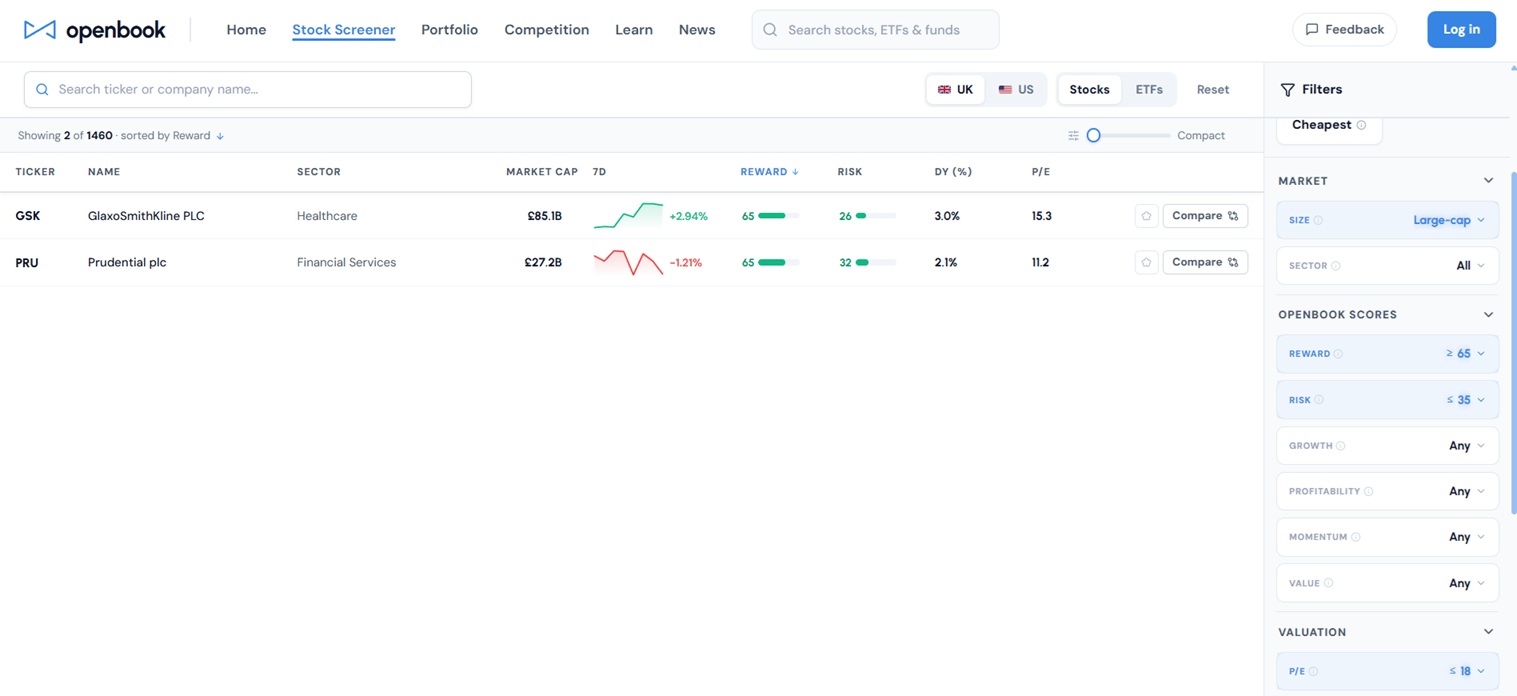
The whole UK large-cap market drops to a short list in seconds. Sort it by Reward, read the top few, and you have somewhere sensible to begin. Switch the toggle to US and the same screen runs across American listings, on the same scoring basis, so the two lists are directly comparable.
How it compares to other free screeners
Finviz, TradingView and Yahoo Finance are capable free tools and worth knowing. Their strength is breadth of raw data. Their weakness, for a UK investor, is two-fold: coverage skews heavily to the US, and the output is a grid of numbers you still have to interpret yourself. Openbook's difference is the factor scores. Rather than leaving you to judge whether a 12 per cent margin and 8 per cent growth add up to a good business, the model makes that read for you and shows the drivers behind it, across both markets. You still do your own research. You just start from a clearer picture.
What the paid plan adds
The free screen above is genuinely useful, but it is deliberately a subset. The paid plan opens up the more granular controls: the individual reward factors (Growth, Profitability, Momentum and Value) as their own sliders, advanced valuation filters (PEG, P/S, P/B, EV/EBITDA), margin and return filters (net margin, operating margin, ROE, ROA), a dividend yield filter, ownership data and beta. If you want to screen for high-growth, low-volatility stocks specifically, those are the controls that let you. Most people do not need them to get value from the free plan, which is the point of having one.
Start screening for free
A free stock screener is only worth anything if you use it with a clear question in mind. If that part is new to you, our guide on how to screen stocks walks through the method. Once you have a shortlist, the stock comparison tool helps you compare the strongest names side by side. Otherwise, open the screener, set a couple of filters, and see what the model rates today. It costs nothing to find out.
Discussion
Log in to join the discussion